
Aké sú hlavné výhody Scolia Pro oproti Scolia Home?
Vo všeobecnosti je Scolia Pro tou najlepšou voľbou, ak je pre vás mimoriadne vysoká presnosť a odolnosť kľúčová. Systémy Scolia Pro sú široko používané v krčmách, baroch, šípkových kluboch a medzi nadšenými jednotlivcami po celej Európe. Stabilita, presnosť a odolnosť tohto systému sú nespochybniteľné. Zaznamenali sme úroveň presnosti vyše 99,8 % pri viac ako 10 000 000 hodov, ktoré boli vykonané na týchto zariadeniach.
Okrem toho estetická a multifunkčná riadiaca jednotka Scolia Pro ešte viac vylepšuje používateľský zážitok. Nielenže ponúka farebne odlíšené vizuálne efekty pre rôzne stavy hracej dosky, ale na malom displeji zobrazuje aj rôzne informácie v reálnom čase a je vybavená nabíjacím portom, cez ktorý si počas hry môžete nabíjať telefón aj tablet.
Čo potrebujem na jeho nastavenie?
For Scolia Pro, allow about 140 cm of width and 110 cm of height on a solid, flat wall, preferably brick or concrete. The minimum ceiling height is 227 cm. Measure the 237 cm throwing distance from the face of the dartboard and leave room behind the throw line. You also need power, space for the processing unit and cables, and an internet connection. Connect the processing unit directly to your router with an Ethernet cable for the most reliable connection. For detailed instructions, read our podrobný návod na inštaláciu alebo si pozrite naše montážne video.

Je potrebné káblové pripojenie k internetu?
Connect the processing unit directly to your router with an Ethernet cable for the most reliable connection. If you cannot run a cable from the router, one wireless option is a Wi-Fi-to-Ethernet bridge such as the Vonets Mini WiFi Router.
Your phone, tablet or computer can use Wi-Fi. If the score display lags, a wired connection may help. You can also mirror your computer screen to a nearby TV or monitor.
Je v prevádzke k dispozícii nabíjací bod pre môj telefón?
Áno, aby výdrž batérie nebola limitujúcim faktorom, je v prípade systému Pro na ľavej strane procesorovej jednotky umiestnená USB nabíjacia zásuvka. Pomocou bežného USB nabíjacieho kábla môžete počas hry nabíjať svoj telefón alebo tablet.

Čo sú to za tlačidlá na procesorovej jednotke?
Za bežných okolností nemusíte s procesorovou jednotkou nijako manipulovať. V niektorých zriedkavých prípadoch však môže byť potrebné použiť tri tlačidlá pod displejom.
- Horné tlačidlo (Objednávka na odnesenie je hotová) prinúti spracovaciu jednotku, aby zmenila svoj stav z Jedlo na odnesenie do Hod, čím sa návšteva aktuálneho hráča fakticky ukončí. Stlačte toto tlačidlo, ak sa návšteva predchádzajúceho hráča skončila (t. j. terč je prázdny), ale stav displeja je stále Jedlo na odnesenie.
- Stredné tlačidlo (Kalibrovať) by sa malo použiť v prípadoch, keď niekto presunul alebo vymenil terč, zatiaľ čo bola zapnutá funkcia Scolia. Tento proces rekalibrácie trvá približne 10 sekúnd. Uistite sa, že počas tejto doby je terč voľný.
- Spodné tlačidlo (Ručné prepnutie) by ste mali použiť v prípade, ak Scolia nedokázala rozpoznať váš posledný hod. Po stlačení tlačidla Scolia vytvorí snímku terča a vyhodnotí ju. Upozorňujeme, že tento hod môžete pridať aj ručne v používateľskom rozhraní. Zvoľte si možnosť, ktorá je pre vás pohodlnejšia.

Čo potrebujem na jeho nastavenie?
For Scolia Pro, allow about 140 cm of width and 110 cm of height on a solid, flat wall, preferably brick or concrete. The minimum ceiling height is 227 cm. Measure the 237 cm throwing distance from the face of the dartboard and leave room behind the throw line. For detailed instructions, read our podrobný návod na inštaláciu alebo si pozrite naše montážne video.
For the original Scolia Home, choose a solid, flat wall. If space is tight, contact Scolia Support before installation. For detailed instructions, read our podrobný návod na inštaláciu alebo si pozrite naše montážne video.

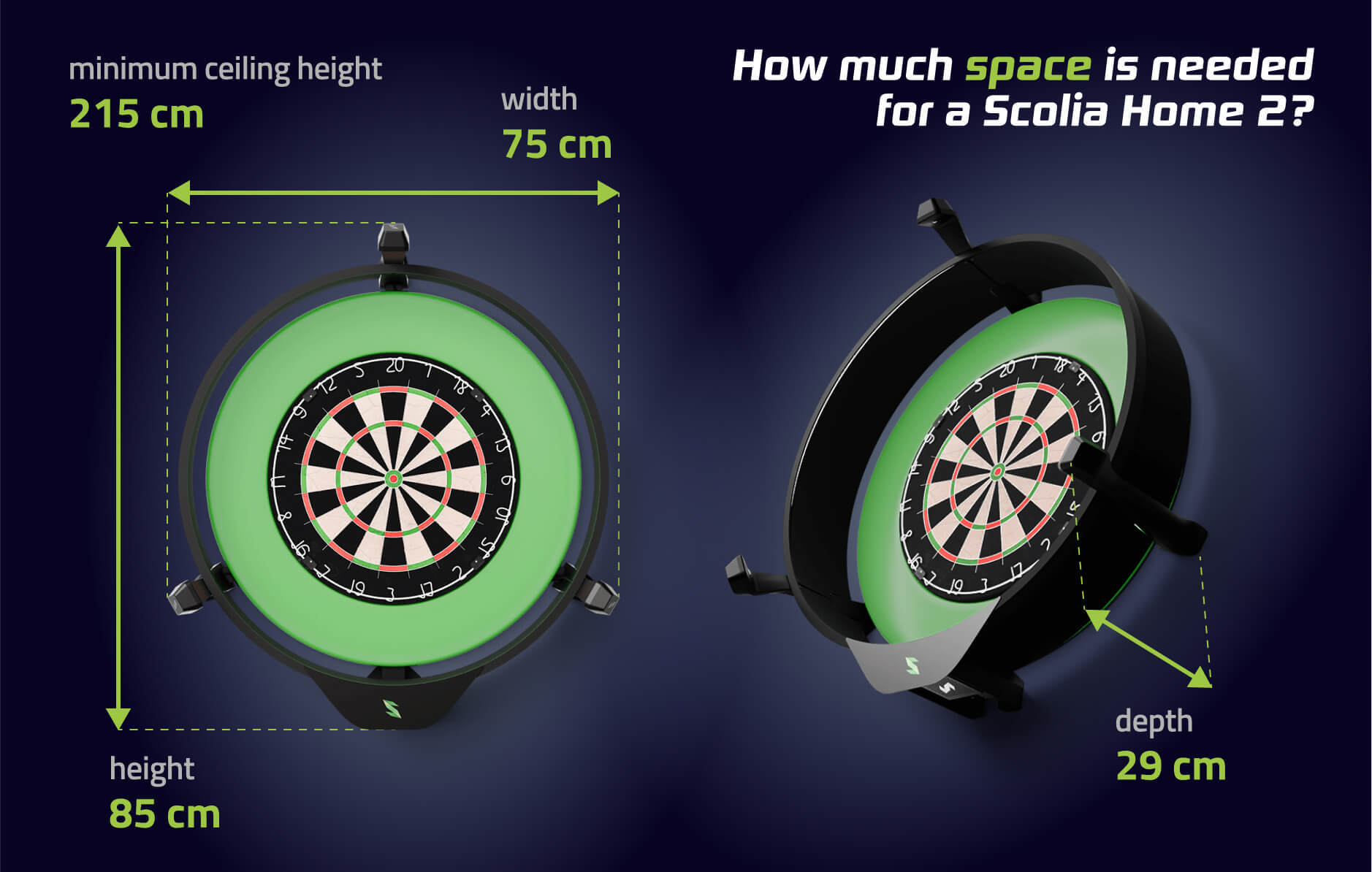
For Home 2, allow at least 75 × 85 cm of flat wall space and a ceiling height of at least 215 cm. See Návody na použitie for the current Home 2 installation guide.
You also need a nearby power supply and an internet connection. Connect the processing unit directly to your router with an Ethernet cable for the most reliable connection.
Je potrebné káblové pripojenie k internetu?
Connect the processing unit directly to your router with an Ethernet cable for the most reliable connection. Home 2 versions 2.2.0 and 2.2.1 use a USB Wi-Fi adapter. Versions 2.3.0 and later have built-in Wi-Fi. You can find the hardware version below the serial number on the processing unit or on the packaging. The original Home can connect through a Wi-Fi-to-Ethernet bridge, such as the Vonets Mini WiFi Router.
Your phone, tablet or computer can use Wi-Fi. If the score display lags, a wired connection may help. You can also mirror your computer screen to a nearby TV or monitor.
How can I register my Scolia product?
- Visit game.scoliadarts.com and log in to your account.
- Navigate to the Moje nástenky page, and click on the Add new board button.
- Enter the serial number of your Scolia product. On Home and Home 2, look on the side of the processing unit, in the supplied user manual or on the side of the box. On Pro, look for the S/N line on the back of the processing unit.

- Give a name to your Scolia board, and enter the town/city where it is located. If your board is in a public place (pub, darts club, bar, etc.), and you would like it to be visible for other people on our Mapa Scolia, you should set the board visibility to public. In this case you will need to add the street address of the board, too.
- Finalize the process by clicking on the Add board button.
How can I connect to Scolia?
Open the Scolia web app on a phone, tablet or computer with an internet connection. To connect:
- Visit game.scoliadarts.com.
- Log in or choose the Play As Guest tab.
- On your own Home board, use Quick Join. Guests can enter the six-character Board Code provided by the owner. The owner can find it in My Boards when the system is online. On Pro, the code appears on the processing unit display.
What are the supported browsers for the Scolia web application?
We recommend the latest version of Google Chrome for the Scolia web app.
Do I have to create an account if I want to play?
You can play on Scolia without registration by playing a Guest Game. However, if you want to have access to the full functionality of the system, you have to create an account. This way, you can browse the history of your games, check your statistics and try out different types of games, too. Registration is quick and easy, especially with our social login functionalities: use your Facebook or Google account to sign up within a few seconds! Visit game.scoliadarts.com, register and enjoy the full functionality of the system!
Do I have to calibrate the system manually?
Scolia carries out the whole calibration process on its own, without any manual support. Note that the calibration process requires the environment of the dartboard to be clear, so that the cameras can scan the entire area of the board.
Can I use a soundproofing system with Scolia?
Yes, Scolia supports the Board of Silence a Karella sound dampeners. For Home 2, use spacers under the camera legs so the cameras and board are mounted on the same plane. Dartsport Wagner makes spacers for these dampeners. With an original Home and Karella, hang the Spark light ring on the dartboard surround. Attaching it directly to the dampener can affect scoring.
Scolia provides limited support pre Winmau Wispa soundproofing system. The vibrations caused by the Wispa’s suspension system can significantly interfere with Scolia’s image processing algorithm. This can occur even when the dartboard surround fits snugly into the ring. Therefore, we cannot guarantee the same performance for setups using the Wispa as we do for regular setups. This doesn’t necessarily mean Wispa always causes accuracy problems. If you are experiencing unexplainable issues, please try:
- tightening the strings of the Wispa to see if that resolves the problem
- removing the Wispa and using Scolia without soundproofing, or try a foam or cushion-based soundproofing system.
We have not tested other soundproofing systems; therefore, optimal accuracy cannot be guaranteed with them.

Aké sú hlavné výhody Scolia Home oproti Scolia Pro?
Scolia Home je ideálnou voľbou pre súkromných zákazníkov, ktorí hľadajú kompaktnú, ľahkú a cenovo dostupnejšiu sadu na automatické zaznamenávanie skóre pre svoj terč na šípky. Systém je určený pre rámček Scolia Spark light. Inštalácia je veľmi jednoduchá a systém zabezpečuje vysokú presnosť zaznamenávania skóre bez toho, aby zaberal príliš veľa miesta.
Aké sú požiadavky na zriadenie Scolia Home?
Okrem štandardného terča na šípky s oceľovými hrotmi budete potrebovať nasledujúce veci:
- Scolia Spark light ring (included with current Home and Home FLEX packages)
- Štandardný rám šípkovej terče
Choose a solid, flat wall, preferably brick or concrete. See the installation guide below for the original Home, or contact Scolia Support if space is tight. Connect the processing unit directly to your router with an Ethernet cable for the most reliable connection. If you cannot run a cable from the router, you can use a Wi-Fi-to-Ethernet bridge or a powerline adapter.
Podrobné pokyny nájdete v našom podrobný návod na inštaláciu alebo si pozrite naše montážne video.

Musím vŕtať do steny, ak chcem nainštalovať Scolia Home?
Nie nevyhnutne. Scolia Home môžete nainštalovať bez toho, aby ste museli do steny vŕtať ďalšie otvory. Stačí pripevniť nožičky na upevnenie kamery a spracovateľskú jednotku k rámu Scolia Spark a zavesiť ho na rám šípkovej terče. V závislosti od tuhosti rámu vášho terča však môžete zistiť, že sa pod váhou Scolia Spark deformuje alebo že nie je dostatočne stabilný. Z tohto dôvodu odporúčame použiť T-tvarové podporné konzoly pre Scolia Home, aby ste osvetlenie Scolia Spark trvalo pripevnili na stenu.
Je potrebné káblové pripojenie k internetu?
For best performance, we highly recommend using a LAN cable to connect your Scolia unit directly to your router, as this solution offers the best and most reliable connection to our servers. If you want to use the Scolia Home system wirelessly, you will need a WiFi adapter, such as the Vonets Mini WiFi Router.
Bezdrôtové pripojenie k internetu môžete využiť aj pre svoje klientske zariadenie. V závislosti od kvality vašej bezdrôtovej siete sa však môžu doby odozvy výrazne líšiť. Ak je pre vás dôležitá nízka latencia, odporúčame preto pre klientské zariadenie použiť káblové pripojenie, aby ste dosiahli čo najlepší používateľský zážitok. Môžete napríklad otvoriť webovú aplikáciu Scolia na svojom počítači a presmerovať jej obrazovku na monitor alebo televízor v blízkosti terča.
Môžem pre Scolia Home použiť iné rámy svietidiel?
We recommend the Scolia Spark light ring for the original Home and Home FLEX. Its enclosed design shields the cameras from external light. We cannot guarantee compatibility or performance with other light rings.
Aké rámy na šípky sa odporúčajú pre Scolia Home?
Väčšina jednodielnych rámov na šípky z PU (polyuretánu) je plne kompatibilná s Scolia Home. Hlavnou požiadavkou je, aby pri použití rámu ako držiaka pre Scolia Spark svetelný rám bol terč umiestnený uprostred svetelného rámu. Aby to bolo možné, približné rozmery rámu by mali byť nasledovné:
- Vonkajší priemer: 68–70 cm
- Width: 11.5-12.5 cm
- Hrúbka: 3–4 cm
Väčšina výrobcov (Winmau, Target, Unicorn, Bull’s) vyrába PU rámy s týmito rozmermi. Jeden z týchto rámov si môžete zakúpiť aj pre svoj nový produkt Scolia Home v našom internetovom obchode.
Ako sa pripojím k fóre Scolia Home?
Na rozdiel od systému Scolia Pro sa na doskách Scolia Home nezobrazuje 6-znakový kód dosky. Systémy Scolia Home fungujú s opravené kódy dosiek, meaning that the board code remains the same until the owner of the board decides to change it. Sign in to the account that owns the board and use Quick Join. Guests can enter the six-character Board Code provided by the owner. The code appears in My Boards only while the system is online. If it is missing, check the processing unit’s power supply and internet connection.
Keď som vyberal šípky z terča, omylom som posunul rámček Scolia Spark light. Musím systém znovu kalibrovať?
Nohy držiace kameru u modelu Scolia Home – na rozdiel od modelu Scolia Pro – nie sú pripevnené priamo k stene. Namiesto toho sú namontované na rámčeku osvetlenia Scolia Spark, čo zvyšuje náchylnosť systému na náhodné pohyby počas hry. Z tohto dôvodu je Scolia Home vhodnejšia pre domáce prostredie. Hoci softvér dokáže kompenzovať drobné pohyby kamier, uistite sa, že nedotýkať sa Scolia zapaľovača Spark ani nôh, na ktorých je upevnená kamera pri vyberaní šípok z terča. Ak sa vyskytne príliš veľa nesprávnych rozhodnutí, prekalibrujte systém na Moje nástenky stránka.
Majú majitelia Scolia Home prístup k rovnakým funkciám softvéru ako majitelia Scolia Pro?
Áno, všetky funkcie webovej aplikácie Scolia sú k dispozícii zadarmo nielen pre majiteľov verzií Scolia Pro a Home, ale aj pre každého, kto sa zaregistruje na game.scoliadarts.com.
Posielate tovar len do európskych krajín?
Our webshop ships mainly to Europe. In the US, visit Obchod s šípkami v USA. V Kanade navštívte Šípky v Toronte. V prípade iných destinácií mimo Európy kontaktujte podporu Scolia.
There is no Board Code after startup, the display status is CONNECTING. What should I do?
Make sure you have your Scolia product registered at game.scoliadarts.com/my-boards. If you have not registered your product yet, perform the following steps:
- Visit game.scoliadarts.com and log in to your account.
- Navigate to the Moje nástenky page, and click on the Add new board button.
- Enter the serial number of your Scolia product. You can find the serial number on the back of your processing unit on the S/N line.
- Give a name to your Scolia board, and enter the town/city where it is located. If your board is in a public place (pub, darts club, bar, etc.), and you would like it to be visible for other people on our Mapa Scolia, you should set the board visibility to public. In this case you will need to add the street address of the board, too.
- Finalize the process by clicking on the Add board button.
The display status is CAMERA ERROR. What should I do?
Check the USB cables of the cameras, and make sure they are properly connected to the extension cables and to the processing unit. Restart the system by turning it off and on again after a few seconds.
The display status is CALIB ERROR. What should I do?
The environment of the dartboard must be clear on start-up. The automatic calibration process fails to execute if one or more objects partially or fully cover the segments of the dartboard. Once you removed every objects that can potentially block the view of the cameras, restart the system. The owner of the Scolia system can monitor the camera images on the My boards page of the web application.

The system makes too many mistakes. What should I do?
Try to recalibrate your system by pressing the middle button (Kalibrovať) on the processing unit, or turning your device off and on again after a few seconds. Make sure the environment of the dartboard is clear during the calibration process. Note that the image processing algorithm expects the dartboard to have standard dimensions, traditional colouring and to be equipped with the traditional metal number ring.
Further tips if you find your system to be inaccurate:
- There should be no strong external light sources (natural or artificial) directed on the dartboard.
- For higher accuracy, we highly recommend avoiding dark coloured points, barrels and shafts.
- The number ring must be central with the number sections.

How can I check the images of the cameras?
- Visit game.scoliadarts.com and log in to your account.
- Go to your My boards page, and pick the Scolia system you are interested in.
- If your Scolia system is online, you can see the still images of the cameras. You can refresh the images at any point by pressing the refresh button in the top right corner.
The Scolia web application does not work properly on my device. What can I do?
We recommend the latest version of Google Chrome for the Scolia web app. Check your internet connection and refresh the page. If the problem persists, update the browser and try another browser or device. When contacting Scolia Support, include your device model, operating system, browser version, any error message and the steps that led to it. A screenshot can help.
The Scolia web application seems to be frozen: it does not detect my throws and/or it shows my board to be offline. What can I do?
Refresh the page, then check the processing unit’s status in My Boards. If it is online and throws are still missing, clear the dartboard and recalibrate. If it is offline or disconnecting during play, check the power and network connection. Contact Scolia Support if the problem continues.
I have bought a second-hand Scolia unit but during board registration I receive an error saying "This serial number has already been attached to another user!". What can I do?
A Scolia system can only be attached to a single user at a time. Contact the seller and ask him to remove the Scolia board from his account. Once the board is not attached to its previous owner, you can register it under your account. Conversely, if you decide to sell your Scolia system, make sure to remove the board from your account.
Aké sú požiadavky na inštaláciu Scolia Home 2?
Home 2 needs a standard steel-tip dartboard, at least 75 × 85 cm of flat wall space and a ceiling height of at least 215 cm. Mount it on a solid wall, preferably brick or concrete. Installation requires drilling. Dartboard stands are unsupported. Measure the 237 cm throwing distance from the face of the board and leave room behind the throw line.
A Scolia light ring is included when you buy Home 2 directly from Scolia.
Connect the processing unit directly to your router with an Ethernet cable for the most reliable connection. You can find the installation guide under Support → User Manuals.
Ktoré rámy svietidiel sú kompatibilné s Scolia Home 2?
Every Home 2 system purchased directly from Scolia includes a Scolia light ring. Older units, second-hand systems and retailer packages may differ. We cannot guarantee compatibility with other light rings.
Môžem použiť Scolia Home 2 v prostredí, ktoré nie je určené na bývanie?
Áno, Scolia Home 2 je navrhnutý tak, aby spĺňal požiadavky rôznych prostredí, ako sú kancelárie, šípkové kluby a šípkové bary. Robustná, no zároveň elegantná konštrukcia zaručuje spoľahlivý výkon a odolnosť vo väčšine situácií. Po inštalácii systému nie je potrebné počas každodenného používania vykonávať žiadne ručné nastavenia ani kalibrácie.
Je potrebné káblové pripojenie k internetu?
Connect the processing unit directly to your router with an Ethernet cable for the most reliable connection. Home 2 versions 2.2.0 and 2.2.1 use a USB Wi-Fi adapter. Versions 2.3.0 and later have built-in Wi-Fi. You can find the hardware version below the serial number on the processing unit or on the packaging. Wi-Fi performance depends on your network.
Your phone, tablet or computer can use Wi-Fi. If the score display lags, a wired connection may help. You can also mirror your computer screen to a nearby TV or monitor.
Majú majitelia verzie Scolia Home 2 prístup k rovnakým funkciám softvéru ako majitelia verzie Scolia Pro?
Áno, všetky funkcie webovej aplikácie Scolia sú k dispozícii nielen pre majiteľov verzií Scolia Pro, Home a Home 2, ale aj pre každého, kto sa zaregistruje na game.scoliadarts.com.
Do I have to press any buttons after my turn?
No. Unlike most darts machines, Scolia automatically detects the takeout events as well. This way, it knows exactly when the visit of a player has ended, so switching from one player to the next one happens automatically.
Can I manually overwrite the wrong scores?
Yes. If you tap on the tile of the wrong score, a Score Correction interface appears on which you can freely change the sector of the given throw. You can also add or remove throws if the detection algorithm of Scolia made a mistake. Note, that only the Game Master is allowed to change scores. The Game Master is the user who started the game. If for some reason this user is no longer online, the Game Master token is given to another user who is connected to the board. This way, it is always possible to overwrite the scores if needed. Score Correction is available only for the last visit of each player.

Can I play local games with multiple users?
Yes, you can absolutely do this. Assuming there are 3 players (A, B a C) who would like to play a game against each other on a Scolia board:
- Each player should register an account at game.scoliadarts.com
- Each player (who would like to see the game on his/her history page) should log in to his/her Scolia account and connect to the board they are about to play on, using the six-character Board Code. The owner can also use Quick Join.
- One of the players (let’s say Player A) should configure the game by adding the rest of the players as users. Use the “user” option in the dropdown when selecting a new player. Player A should see both Player B a Player C in the options (provided that they have connected to the board), so he can add them to the game.
- Start the game.
- When the game is finished, all the players should see the results in their corresponding history pages.
Can I play online with my friend?
Yes! Since August 2020, Online Gaming is available for all Scolia devices. Choose the Online Game tile on the Dashboard, join the lobby and play against your friends or anyone else!
How does Scolia handle bounce-outs?
In order to ensure robustness against external noise coming from various sources (ambient lights, moving objects, etc.), Scolia detects bounce-outs indirectly. At the end of each visit, Scolia can figure out if one or two bounce-out throws happened, and adds None throws automatically to the missing places. This way, there is no need to manually register the bounce-outs, Scolia does it automatically for you. In the extremely rare case of throwing three consecutive bounce-outs, just press the top button (Objednávka na odnesenie je hotová) on the processing unit to switch to the next player. It is worth noting that bounce-out throws are detected directly in some special cases (e.g. if the bounce-out throw moves another dart that is already in the dartboard).
How does Scolia handle throws off the board?
If you fail to hit the board with your throw, Scolia might not be able to detect it. Since this off-the-board throw has no score, it is handled similarly to a bounce-out throw, i.e. Scolia will add a None throw after you finished your turn.
How does Scolia handle "Robin Hood" throws?
Robin Hood throws are quite challenging to detect. Still, in most cases Scolia correctly identifies these throws as None throws with 0 score. Use the Score Correction interface on the web application to adjust the score if needed.

Can I leave or abort the game?
You can leave the game at any point. If you are the Game Master of the running game, you are also allowed to abort the game. Be aware that if you abort the game, all the clients who are connected to the board will be redirected to the game statistics page.
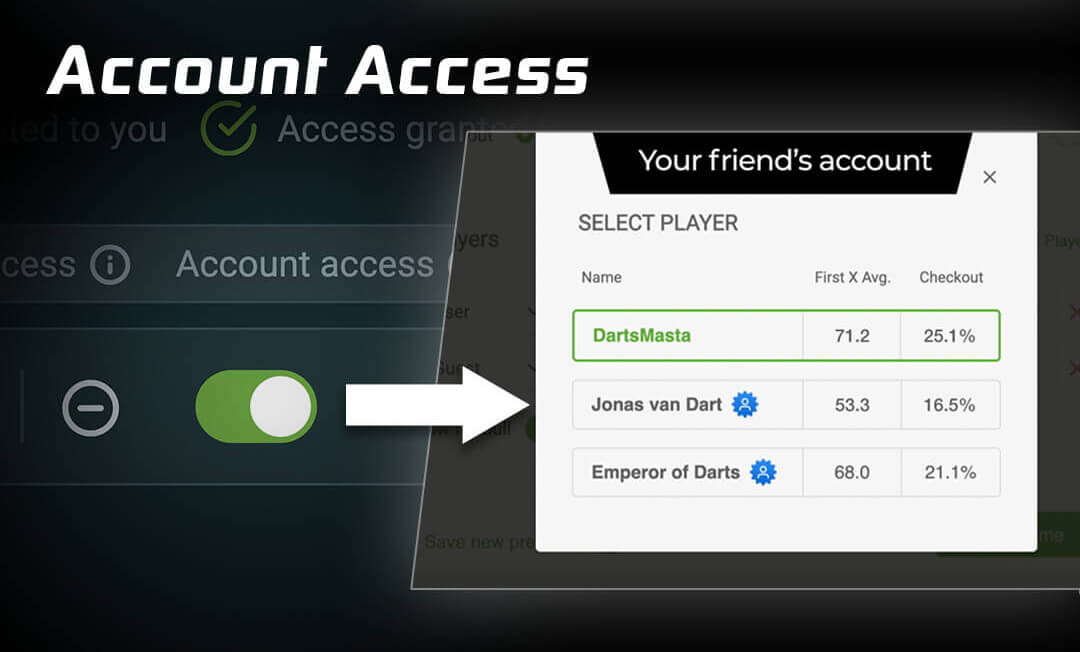
What is Board Access and Account Access?

Where do I find the serial number of my board?
Look for the serial number on the side of the processing unit, in the supplied user manual or on the side of the box. It has 12 letters and numbers in three groups of four, separated by hyphens, for example A1BC-DE2F-G3JH.
For a registered board, you can also find the serial number under Moje nástenky in the Scolia web app.
I have registered my board but it seems to be offline. What should I do?
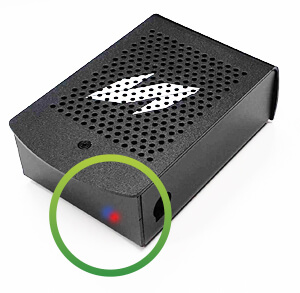
Make sure that you have attached the appropriate power supply to the processing unit. If the processing unit is operating correctly, you should see a constant red light and a blinking blue light next to the power supply plug after 20-30 seconds of turning on the unit. Check the power, indicator lights and network cable. To rule out a wireless or adapter problem, connect the processing unit directly to your router with an Ethernet cable and check My Boards again. Restart the router and processing unit if needed. If it stays offline, contact us at info@scoliadarts.com with the serial number, a short video of the lights, your connection type and the steps you tried.

The system makes too many mistakes. What should I do?
Try to recalibrate your system by pressing the Calibrate link on your Moje nástenky page, or turning your device off and on again after a few seconds. If calibration fails, the cameras have moved or you use an unusual number ring, check Camera Arrangement in My Boards against the actual camera positions. Clear the dartboard before recalibrating.
Your dartboard – including the number ring – should fit entirely within the green areas on the camera images.

Further tips if you find your system to be inaccurate:
- All the screws should be tightened properly at the hinge joints, so that they cannot move accidentally during the game.
- The Scolia Spark light surround itself should be stable enough. We highly recommend using the T-shaped brackets to attach the Scolia Spark to the wall in a more stable manner.
- Avoid strong light aimed at the dartboard. Keep monitors and TVs outside the cameras’ view. Moving images and reflections can register as throws.
- For higher accuracy, we highly recommend avoiding dark coloured points, barrels and shafts.
- The number ring must line up with the scoring segments. Replace a heavily worn board if loose sisal, shifted wires or damaged segments interfere with scoring or calibration. Rotate the board periodically to spread wear.
How can I check the images of the cameras?
- Visit game.scoliadarts.com and log in to your account.
- Go to your My boards page, and pick the Scolia system you are interested in.
- If your Scolia system is online, you can see the still images of the cameras. You can refresh the images at any point by pressing the refresh button in the top right corner.
The Scolia web application does not work properly on my device. What can I do?
We recommend the latest version of Google Chrome for the Scolia web app. Check your internet connection and refresh the page. If the problem persists, update the browser and try another browser or device. When contacting Scolia Support, include your device model, operating system, browser version, any error message and the steps that led to it. A screenshot can help.
The Scolia web application seems to be frozen: it does not detect my throws and/or it shows my board to be offline. What can I do?
Refresh the page, then check the processing unit’s status in My Boards. If it is online and throws are still missing, clear the dartboard and recalibrate. If it is offline or disconnecting during play, check the power and network connection. Contact Scolia Support if the problem continues.
I have bought a second-hand Scolia unit but during board registration I receive an error saying "This serial number has already been attached to another user!". What can I do?
A Scolia system can only be attached to a single user at a time. Contact the seller and ask him to remove the Scolia board from his account. Alternatively, send us an email to info@scoliadarts.com with the Scolia unit’s serial number. Once the board is not attached to its previous owner, you can register it under your account. Conversely, if you decide to sell your Scolia system, make sure to remove the board from your account.
Where do I find the serial number of my board?
Look for the serial number on the side of the processing unit, in the supplied user manual or on the side of the box. It has 12 letters and numbers in three groups of four, separated by hyphens, for example A1BC-DE2F-G3JH.
For a registered board, you can also find the serial number under Moje nástenky in the Scolia web app.
I have registered my board but it seems to be offline. What should I do?
Check the power, indicator lights and network cable. To rule out a wireless or adapter problem, connect the processing unit directly to your router with an Ethernet cable and check My Boards again. Restart the router and processing unit if needed. If you use Wi-Fi, also check the network name, password and signal strength. The red light should be on, while the blue light should be blinking if your unit is operational.
If the unit stays offline, contact us at info@scoliadarts.com with the serial number, a short video of the lights, your connection type and the steps you tried.
The system makes too many mistakes. What should I do?
Try to recalibrate your system by pressing the Calibrate link on your Moje nástenky page, or turning your device off and on again after a few seconds. If calibration fails, the cameras have moved or you use an unusual number ring, check Camera Arrangement in My Boards against the actual camera positions. Clear the dartboard before recalibrating.
Further tips if you find your system to be inaccurate:
Fit the supplied side covers and minimise any gap to the dartboard surround. The covers reduce stray light but cannot block it all. Keep monitors and TVs outside the cameras’ view. Moving images and reflections can register as throws.
Mount the Scolia system on a solid wall (preferably brick or concrete).
Use conventional steel-tip darts with clearly visible points, barrels and shafts. Flexible Reflex points can vibrate after impact and register an extra throw.
- The number ring must line up with the scoring segments. Replace a heavily worn board if loose sisal, shifted wires or damaged segments interfere with scoring or calibration. Rotate the board periodically to spread wear.
How can I check the images of the cameras?
- Visit game.scoliadarts.com and log in to your account.
- Go to your My boards page, and pick the Scolia system you are interested in.
- If your Scolia system is online, you can see the still images of the cameras. You can refresh the images at any point by pressing the refresh button in the top right corner.
The Scolia web application does not work properly on my device. What can I do?
We recommend the latest version of Google Chrome for the Scolia web app. Check your internet connection and refresh the page. If the problem persists, update the browser and try another browser or device. When contacting Scolia Support, include your device model, operating system, browser version, any error message and the steps that led to it. A screenshot can help.
The Scolia web application seems to be frozen: it does not detect my throws and/or it shows my board to be offline. What can I do?
Refresh the page, then check the processing unit’s status in My Boards. If it is online and throws are still missing, clear the dartboard and recalibrate. If it is offline or disconnecting during play, check the power and network connection. Contact Scolia Support if the problem continues.
I have bought a second-hand Scolia unit but during board registration I receive an error saying "This serial number has already been attached to another user!". What can I do?
A Scolia system can only be attached to a single user at a time. Contact the seller and ask him to remove the Scolia board from his account. Alternatively, send us an email to info@scoliadarts.com with the Scolia unit’s serial number. Once the board is not attached to its previous owner, you can register it under your account. Conversely, if you decide to sell your Scolia system, make sure to remove the board from your account.