Does the Fliq stream my board as well?
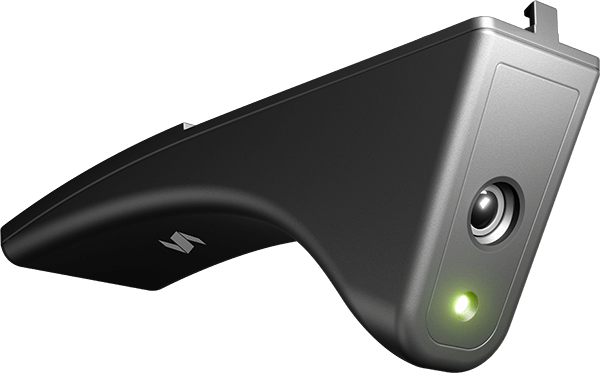
Fliq has a single camera facing the player in front of the dartboard. However, the top camera of your Home 2 system is being used for streaming a high resolution live view of your dartboard to create a complete interactive experience.
Is Fliq compatible with Scolia Home and Pro systems as well?
Primarily, Fliq is designed to physically attach to the top leg of the Scolia Home 2.
With the addition of the Upgrade Kit, almost all (98%) Scolia Home systems will be compatible with Fliq. Please check your unit’s compatibility through this form.
Fliq is not compatible with Scolia Pro.
You can use the Video Chat feature on your own device anytime — it’s completely free.
Can I see how my opponent sees my camera stream?
Yes. You can check your camera view when setting up the Fliq and before your game starts. You’ll also see a picture-in-picture view of yourself in the corner of the screen during gameplay.
Can I talk with my opponent through the Fliq?
No, the Fliq camera does not include a microphone. To talk to your opponent, you can start a Video Chat with your own device (phone, tablet, webcam, etc.). Alternatively, you can use the Instant Messages function to send your opponent a text message.
Can I use it for livestreaming on Twitch?
Only with the consent of your opponent. Technically, you can stream to Twitch and other platforms using third-party software like OBS. If your Fliq Live Stream is activated, your Fliq video will automatically appear on your game screen — no additional setup is required.
Does Fliq enhance fairness in online games and tournaments?
We strongly believe it does. Streaming provides visual evidence in cases of potential violations of the Code of Conduct. If you encounter suspicious behavior, please send the details of the specific game to info@scoliadarts.com so our team can review the footage. Confirmed cheating will result in suspensions or bans.
Do I have to remove the side covers to use the Fliq?
No, you can attach and use the Fliq camera with or without the side covers.
Can I use the Fliq camera in any room and lighting condition?
Yes, you can. However, for the best streaming quality, we recommend using ceiling or ambient light. Low light may result in a lower quality video stream.
Is there any subscription fee for the Fliq camera?
No. All features are included out of the box — there are no subscription fees.
How do I know the Fliq camera is active?
The green status LED will be on. For added privacy assurance, Fliq activates automatically only during online games.